 Stringino
Hear it.
See it in color.
Play from the score and Stringino listens through the microphone, then shows the result in color right on the sheet music. You see at a glance which notes were right and which were off. Covers the violin range, from the open G string (G3) upward.
Download on the App StoreiPhone & iPad / Free to use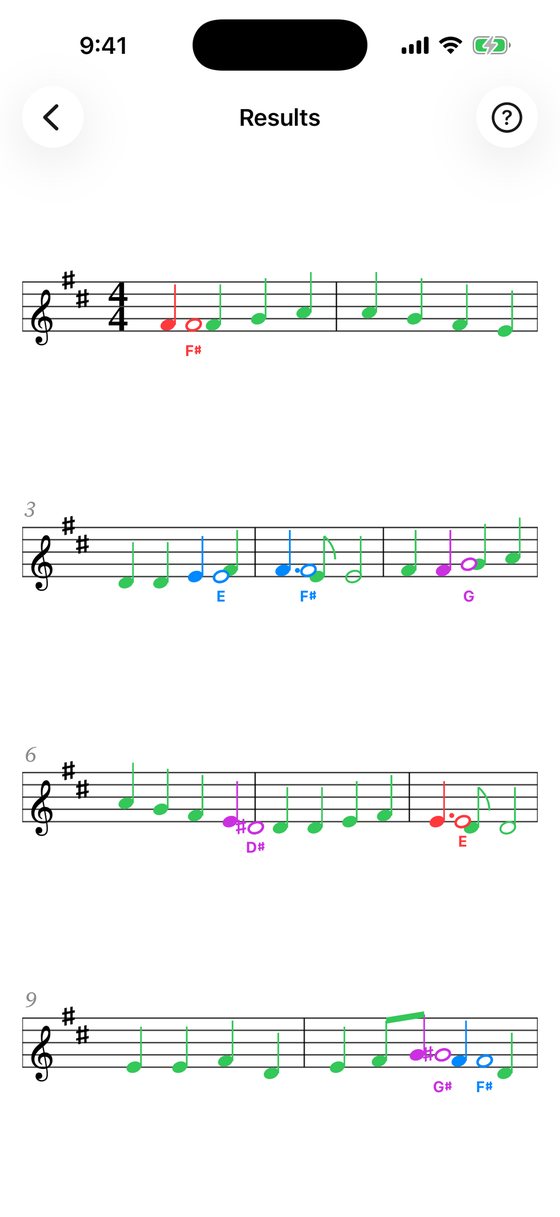
Six things that make practice better
For kids and grown-ups.
See it in color
Right notes are green, a little flat is blue, a little sharp is red, a different note is purple. The pitch you played is shown on the staff.
Loop a passage
Tap notes to pick a range and repeat it. Spots you keep missing are highlighted.
Watch yourself improve
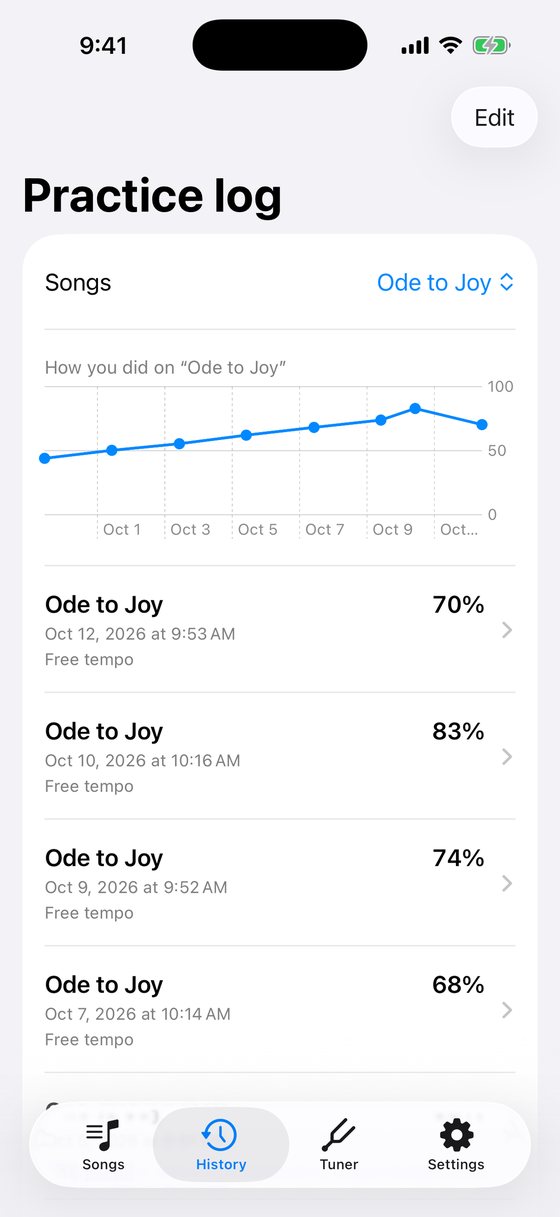
Every session is saved in your history, with a graph of accuracy for each piece.
Kid-friendly or grown-up wording
Switch the interface wording between simple language for children and standard wording for adults (Japanese UI).
Import and edit scores
Import MusicXML and MIDI, edit notes, time and key signatures. With Pro, scan paper music from a photo or PDF.
No recordings kept
Audio is analyzed entirely on your device. Nothing is recorded or uploaded.
See your progress.
Every practice session is saved. A graph shows how the share of right notes changes for each piece. A little better than yesterday, a little better than last week — it keeps you going.
- A graph of accuracy for each piece
- A list of every session with date, tempo and result
- History stays on your device (delete it anytime in Settings)
Pro (monthly subscription)
Scan import — turning paper sheet music from a photo or PDF into an editable score — is part of Pro (600 JPY per month in Japan, auto-renewing, Up to 20 credits per month (20 pages at Standard accuracy, or 10 at High)). Everything else is free.
Frequently asked questions
What does Stringino do?
Stringino is an iPhone and iPad app that helps with violin practice. Play from the score and it listens through the microphone, then shows the result in color on the sheet music: green for right notes, blue for a little flat, red for a little sharp, purple for a different note. It gives no scores or grades; it lists the spots to fix.
Does it replace a teacher?
No. It is a helper for practice at home, between lessons. It cannot judge posture or bowing.
Which instruments and range does it support?
The violin range, from the open G string (G3) upward. Lower notes such as viola and cello low strings cannot be judged yet.
Are my recordings saved or uploaded?
No. Audio is analyzed entirely on your device and is never saved or sent anywhere. There is no account, no ads and no tracking.
How much does it cost?
The basics are free: practice with feedback, tuner, history, score editing, and MusicXML and MIDI import. Only scan import, which turns paper sheet music from a photo, PDF or camera into an editable score, is part of Pro: a monthly auto-renewing subscription (600 yen in Japan; price varies by country), Up to 20 credits per month (20 pages at Standard accuracy, or 10 at High).
Is it suitable for children and beginners?
Yes. It was made so that parents, who often cannot hear small pitch errors, can support a child's practice at home. The Japanese interface can switch between simple wording for children and standard wording for adults.
What devices and languages are supported?
iPhone and iPad running iOS 17 or later. The interface is available in Japanese and English.